Showing posts with label Google. Show all posts

Tuesday, July 1, 2014

Android L Preview Source Code Now Available for Nexus Devices

 
After releasing the Android L developer preview images for some Nexus devices, Google has now posted the source code on the AOSP (Android Open Source Project) for an even wider range of devices.
Notably, Google's Android Git repo page lists the source code for the following Nexus devices - Nexus 4, Nexus 5, Nexus 7 (2012), Nexus 7 (2013) and Nexus 10.
9to5Google points out that the source code does miss out few things such as binary packages and kernel source.
Google, at its I/O 2014 Keynote, announced the "L" release of Android and called it the most ambitious Android release yet. Currently known only as Android L, there's no codename or even a formal version number yet. Android L is expected to release later this year, though an exact date isn't known.
With Android L, Google has refreshed the interface design of the entire operating system. The company identifies it as the new "Material Design" which is bolder, more colourful, and more animated. Various changes to UI include a new dialler, refreshed Android navigation buttons, redesigned transition animation and more. Overall, the design theme focuses on elevation values of UI elements within apps.
The default Chrome browser has been upgraded on Android L as well and the Google search results can now be links that trigger an app, rather than links to websites. Google has notably ditched the Dalvik runtime in Android L and has introduced ART for 64-bit, which allows apps to run faster, and is compatible with ARM, x86 and MIPS architectures.
Other than improved performance, Google is also aiming for a better battery life in Android smartphones with its Android L. The introduced Project Volta improves the "instrumentation" of battery data through a tool called "Battery Historian." Google has also added a "Battery Saver" mode in "L" which can be triggered manually or configured to be enabled automatically when the battery is low.
Earlier, HTC and Nvidia announced Android L updates for some of their devices as soon as Google makes it publicly available.
Read More: http://gadgets.ndtv.com/mobiles/news/android-l-preview-source-code-now-available-for-nexus-devices-551532

Monday, June 30, 2014

What If Google Play Looked Like This?


Formerly known as Android Market, Google Play is great overall. The reason why we all love the PlayStore is that all our favorite apps and games are just some install permissions away. It also makes browsing apps easier as you dont have to browse them from the device. You can simply browse the apps on your desktop’s larger screen estate and install them. The browsing experience is much better than the iOS store which is trapped on the iDevices.
However one thing that’s always bugged me is the design of the Play Store. Sure it’s not hideous but it could look a lot better. Google, the web experts, the people who make absolutely stunning apps for both Android and iOS, haven’t put much design effort into the second biggest app store in the world. The user experience though is amazing, like most Google services.
Enes Dani? agrees with us and obviously thought the same. So in his free time he came up with a random concept that keeps most of the elements of the original design but makes it a lot prettier and professional. Of course with this being an experimental concept, things are far from perfect. Though the vision is there, that’s the main thing. Check out the concept below.

 copyright: http://www.honeytechblog.com/what-if-google-play-looked-like-this/

Sunday, June 29, 2014

Missed Google I/O? Here are 5 big things you need to know


Google I/O has already come and gone. If you missed the three-day showcase of Google’s latest innovations, don’t worry. Here are all the big news items you want to know.

The next version of Android is Called “Android L”

This year, Google’s latest operating system is departing from the typical, sugar-coated naming tradition. Dubbed as “Android L,” the next edition of Android with a minimalist name has been designed with anything but minimalism in mind. Google is packing a ton of new features in Android L all while making the OS feel faster and run better than ever.
Some highlights from the latest Google update include enhanced notifications, unlocking your device with your Android Wear smartwatch, better search, better graphics processing, better battery life, and more-integrated search. Google is trying to make as much about Android a little better with Android L, and you can read about all the major changes here.

Android Wear isn’t sexy, but it sure is smart

google-i-o-2014
Google I/O has already come and gone. If you missed the three-day showcase of Google’s latest innovations, don’t worry. Here are all the big news items you want to know.

The next version of Android is Called “Android L”

l-developer-preview_0028-970x0 This year, Google’s latest operating system is departing from the typical, sugar-coated naming tradition. Dubbed as “Android L,” the next edition of Android with a minimalist name has been designed with anything but minimalism in mind. Google is packing a ton of new features in Android L all while making the OS feel faster and run better than ever.
Some highlights from the latest Google update include enhanced notifications, unlocking your device with your Android Wear smartwatch, better search, better graphics processing, better battery life, and more-integrated search. Google is trying to make as much about Android a little better with Android L, and you can read about all the major changes here.

Android Wear isn’t sexy, but it sure is smart

Android Wear hands on Google’s new Operating System for wearables, Android Wear, was announced a few months ago in March. Here at I/O we finally got an up close look at the new technology for our wrists. Based on our first impressions, Android Wear has a lot of potential as a useful watch, but it might be a while before we get a truly beautiful device.
At Google I/O we also learned just how users will use Android Wear in their daily life. “Glanceability” still remains Google’s biggest focus, and the company will be using all the data it learns about you to make the Android Wear experience a personalized one that knows when you want certain information. Notifications will come in three main types — stacks, pages, and replies — and will allow you to interact with everything from direction to text messages from your friends and family.
One thing Android Wear is still figuring out is how to look sexy. Wristwatches, as much as they help tell time, are also an important piece of jewelry for many, and the days of ugly smartwatches are still around. However, some of the upcoming Android Wear devices, such as the Moto 360, are finally starting to look rather interesting.

Google is unifying development for all its products


Since Android’s debut in 2007, Google has taken the experimental OS for cellphones and turned it into the leading standard across consumer electronics of all sorts of shapes and sizes. To help keep things simple for developers and end-users, Google spoke a lot about how it’s unifying the Android experience for these many devices, and making it easy for developers to build applications that interact with all devices at once.
With wearables like Google Glass and Android Wear, Google is making Android Wear a seamless experience between your smartphone and the gadgets you connect to it. Notifications will automatically appear on your peripherals with no additional coding, and with a few lines of code developers can let users interact with their wearables using one of Google’s three notification types: stacks, pages, and replies. This allows developers to easily add support for Google’s new Android Wear technology, and gives users a similar experience no matter what device they use.
The notification standard is extending beyond Google’s mobile products, too. Users of Chromecast and Chrome OS will see similar connectivity and notifications on their devices when they connect and interact with their smartphones. The idea is that notifications across all Chrome and Android devices will be similar in style and easy for users to recognize and interact with. This unity will help Google sell these products as a complete experience for users.

Google’s Cloud is predicting the future (sort of)

Google Brings Android One Sub-$100 Smartphone Program

At the Google I/O 2014 keynote presentation, Senior Vice President Sundar Pichai announced the company’s new program to bring affordable Smartphones to the masses. Dubbed ‘Android One’, Smartphones launched under this program will be both affordable, and receive regular software updates.
Still skeptical? This will perhaps take that away…
Google will themselves seed regular Android updates to all Smartphones (and not the handset vendors like Micromax, Spice etc) under Android One, just like they do for the Nexus lineup and the separate Google Play Edition handsets.
To many, it might seem as if Google is simply detaching the Play Edition brand from the Play Store, but attaching a cheaper price tag to it. There is a certain degree of truth to that; the first Android One Smartphone will cost under $100. More on that later.
However, Android One goes further than that. Google is providing OEMs with reference hardware platforms, which will enable them to produce powerful handsets are lower costs. To achieve this, the Mountain View company has paired up with our very own Micromax.
Surprised? We were too. With this new partnership, Micromax is effectively launching itself as a brand to be recognized across the globe, even though they market and sell most of its products in India (and Russia where they launched couple of handsets). It does set the stage for Micromax to launch across Europe, perhaps even in the US some day.

 Alright, snapping back to the present day, Google also announced the first Android One Smartphone from Micromax. We even have some details regarding its specifications – a 4.5-inch display, dual-SIM slots, FM Radio, microSD card slot.
Read more: http://trak.in/tags/business/2014/06/26/android-one-smartphones-micromax-karbonn-spice/

App Review: Angry Birds Epic (iOS, Android, WP): Thrown into RPG Land!

“Sometimes you just have to let go of what has worked well for you so far. And try something altogether new.” No, we are not giving some self-improvement sermon here. We are just talking of the latest Angry Birds game in tech town, Angry Birds Epic. Almost six years ago, the game became a rage all over the world because of its physics based gameplay which involved hurling furious birds through slingshots at adversarial swine hiding behind fortifications. The locales changed – we went to Rio, to outer space and even got some Star Wars into the act – but the gameplay remained fundamentally the same: you put a bird into a slingshot, worked out the angle and force of your attack at the pigs. And let rip.

The past year, however, has seen Rovio trying to shake off the catapult physics game heritage of the Angry Birds brand. First there was the Bad Piggies game which was more about building things than destroying them and then there was the unabashed go karter, Angry Birds Go. And now comes Angry Birds Epic, which sees Rovio yank the birds into combat and RPG territory. Yes, you heard that right, and if you happen to be a fan of the turn-based combat system of the early versions of Final Fantasy and games like Septerra Core, say ‘hooray’ because now your favourite feathered heroes are in similar mode.One thing that has now changed, however, is the storyline. It still is about pigs stealing the birds’ eggs and the birds then going on a pig battering spree on the path to claim back what is rightfully theirs. Only this time there is no flinging or throwing birds at fortifications. What actually happens is that your bird – you start out with one, but pick up followers along the way – faces a page. It strikes a blow at the pig, then the pig strikes a blow, then the bird strikes a blow…and so on until one of the aforementioned warring parties kicks the gaming bucket. Cue celebrations by the winner and if it is the bird, some loot and extra points. Classic turn-based combat if you will. As you go along, you get new weapons, new kinds of birds (which blow up multiple pigs with a single attack), and of course, more adversaries. It soon comes to the stage when there are a group of pigs facing a group of birds and you have to pick and choose how to make your next attack and at whom – some pigs are more powerful than the others – do you leave them for the end or take them out right away? Decisions, decisions…


 Read more: http://techpp.com/2014/06/25/angry-birds-epic-app-review/

Thursday, June 26, 2014

Google Play adds motion tracking, credit card scanning, and dynamic security to apps


Google launched its Google Play services back in 2012. The collection of proprietary software development kit (SDK) and application programming interfaces (API) provided a huge collection of new functionality within Android apps and integration within the Google ecosystem. Google announced the latest version of Google Play services, version 5.0, at its ”Google Play services Rocks!” session during Google I/O 2014.
Google focused on some of the new APIs that will be included in Google Play services 5.0, which was previewed by Google during its afternoon session.

Send messages to Android Wear

Google immediately dove into APIs for Android Wear devices, one of the stars of the Google I/0 2014. For developers planning to make an app for wearables, they will be able to put to use the Message API to send messages and tasks between wearable device and phone. For example, a user could change song playing on the Android phone from a watch. An additional Asset API will allow assets to be sent between wearable and phone. This would allow a user to, say, download an image on the phone and have it automatically resized and displayed on the face of the wearable device. The final piece of the Android Wear API puzzle is the Data API, which will sync the data between the devices.

Google Play will let you scan your credit cards

One of the other major focuses for Google Play services 5.0 comes from the retail front, for both the consumer and the business. Purchasing has been made easier with the inclusion of Optical Character Recognition (OCR) scanning, which will allow users to scan their credit cards with their smartphone’s camera and have the information automatically gathered and entered into text fields. Additionally, a new Address API can gather an address — with user permission — to fill out a shipping form with no typing required. Finally, a featured called Wallet Fragments makes it easier to use the “Buy with Google” feature and will make it easier for retailers to include the button in their digital storefronts.

Save your stuff to Google Wallet

On the selling side of the transaction, retailers will be able to push more information to their customers. A “Save to Google Wallet” button will make it possible for users to store loyalty cards, coupons, discounts, and bonuses all within their Google Wallet. Merchants can add their cards straight to a user’s Google Wallet rather than requiring a consumer to provide information or sign up for a program. With this, stores can offer benefits and offers when a person walks in the door, utilizing location and context.
For digital retailers, new features have also been added within Google Analytics for applications. This service will show how users are downloading and installing apps, performing in-app purchases, and getting updates. It’s a wealth of information for developers to make use of to better understand how apps are used. Enhanced e-commerce analytics track how users shop, down to how often users view product details and when they put items into their carts.

Mobile in-app purchase ads targeted toward you

Advertising is still a major stream of revenue in mobile and Google Play services 5.0 is looking to improve upon the current method. Google recently introduced in-app purchase ads that prompt users to purchase different goods from within an app. For those looking to place advertisements, in-app purchase ads can be targeted to specific demographics so retailers can reach a given audience.

Gifting games and game power ups

Last year, Google introduced a major overhaul to its gaming service. It continued to expound upon the framework it set by adding new features in Google Play services 5.0. Game Gifts API will give users the ability to request a gift – an extra life or power-up in a game, for example – which can be provided by another player. Gamers’ profiles will also be centralized for all gaming activities, placing experiences, game progress, titles, levels, achievements in one place. A persistent game experience is also being built within the latest Google Play services, so players can pause a game and continue playing on any device without losing progress.
Google also introduced a concept for game developers that it referred to as Events and Quests. Using analytics, developers will be able to see which parts of games are used frequently and how players complete certain tasks. Using this data, Google posits developers can create quests with specific tasks based off how users play.

Google Play can track your walking and running

Google added to its collection of activity recognition features with Google Play services, now including the ability to track walking and running. In an on-stage demo, the new APIs were put on display using a game. You give a command to start walking or to stop moving, and it responds to your movement as it’s tracked. Google seems to have no issue differentiating between walking, running, and stagnant movement.

Better in-app search

Developers will be able to make Google Search aware of content deep within an app using the new App Indexing API. This will allow Google Search to pull up data that it would otherwise miss from within an application. Google states this will help developers to drive user engagement.

Dynamic Security

A new feature included in version 5.0 of Google Play services is the Dynamic Security provider. This tool allows developers to pick up a security provider that will ensure its apps are up to date. The security provider is also capable of spotting and fixing vulnerabilities without requiring extra patchwork work from developers.

Google Maps with panoramic Street View

Google Maps on Android gets a significant boost in the new Google Play services with the updated version of Google Maps Android API. It now includes Street View and its panoramic 360 views. Users will be able to use the Street View camera natively within an application for the first time. Google challenged the developers in the audience to create an app that would display Street View from a current location so users can experience Street View as they travel in real time.
The latest offering of Google Play services, now up to version 5.0, is already rolling out to developers and should be widely available soon.

Protesters make their presence known before and during Google I/O


Google protesters made their presence known before and during Google’s developer conference, which takes place at its headquarters in Mountain View, California.
Starting on Tuesday, Occupy Google supporters showed up on Google’s campus with signs that show the group’s pro-net neutrality emotions:

As Tuesday night rolled around, Google called in the police. Though they seemed quite lax, according to Occupy Google’s Twitter feed, officers began asking demonstrators to leave. Police said that if they failed to do so, they would be arrested for trespassing:
According to the Mountain View Police Department, 10 protesters were arrested. While the department confirmed Google was “supportive” of the protests, the search giant wasn’t supportive of the protests overnight, beginning at 9pm local time.
Based on the police’s account, demonstrators were told to leave, but that they could come back in the morning. Two demonstrators sat down and refused to leave, which led to their arrest. Several others remained in the area, with Google subsequently signed a Private Person’s Arrests for Trespassing, with all 10 having been arrested “without incident.”

Broadcast live streaming video on Ustream
Protests, however, didn’t stop there. During Google I/O, a demonstrator shouted evictions allegedly caused by a Google employee.
The unnamed protester held up a t-shirt that read “develop a conscience, stop Jack Halprin.” Halprin, a Google attorney, was the subject of an April protest that had protesters assemble outside his seven-unit home. They accused him of evicting all other six tenants from the property, with at least two of the evicted tenants saying they were San Francisco teachers, based on a report by SF Examiner.
Roughly an hour later, another protester made his voice known. He shouted out, “Don’t work for a totalitarian company that builds robots that kill people!” He also said “you know that’s true” before being escorted out of the area.
Protesters and Google have been butting heads for a number of years. Back in 2008, a group of Japanese lawyers and professors protested Google’s Street View functionality. More recently, protesters criticized Google’s private bus program, which employees use to go to Google’s headquarters in Mountain View. Protesters blocked two buses ferrying Google and Apple employees to work, arguing that the buses were a metaphor for the increasing wealth gap protesters blame on Google and Apple, among others.
The protesters purport that the wealth created by these firms fail to trickle down to the local community, pushing property prices sky high and generally having an adverse effect on the area.
With Google and Apple further expanding their work spaces, it’s likely that more protests will continue to surface.

Google integrates QuickOffice into Docs with native Word doc editing


Google’s foray into productivity apps with its Docs, Slides, and Sheets apps has been a success. At Google I/O 2014, the company announced that its app suite will feature full QuickOffice integration and allow for native Office editing within Google’s own Chrome and Android apps. The mobile office suite also added Slides to its offerings.
Two years ago, Google purchased QuickOffice and since then, it has been hard at work incorporating the service into its own productivity app suite. With Android L and the latest version of Chrome, Google fully integrated QuickOffice’s great functionality into its apps. Now, users will be able to edit and create documents when they are offline. Users will also be able to edit native Microsoft Office Word Docs in the Google Docs app.
Previously, Gmail would convert the Word doc into a Google Docs file. So now, when you receive an email from a colleague or friend with a Word document attached, you can open the Word file in the Google Docs app in its original format. All changes you make will be saved on the Word file and you can email the edited document back to its sender in its original format.
Google hopes that these updates to its productivity apps will encourage even more people to switch from Microsoft Office and the traditional windows infrastructure to Google’s app suite and Chrome OS. So far, the company’s evangelical efforts have succeed. Google says that Drive now has 190 million 3o day active users and that more established businesses, startups, and schools are converting to Google’s setup on Chrome.
Android head Sundar Pichai announced that 67 of the top 100 startups use Google’s services, as do 58 percent all Fortune 500 companies and 72 of the top 100 universities.
To encourage more enterprises to make the switch, Google introduced Drive for Work, which offers special encryption for added security and unlimited cloud storage for just $10 per user each month.

Monday, November 25, 2013

News for Google+ "now you can call anyone with the Hangout."

Google adds new features to Google+. Despite the efforts, however, the social network in Mountain View sluggish.

Vic Gundotra, Senior Vice President of Engineering division of Google.
Google has just announced the introduction of an important new concerns that Google+, the social network in Mountain View. From today the Hangout (called Hangouts) allow you to call any phone number.
"In some cases it happens that you would like to invite someone to join a Hangout" writes Jordanna Chord by his Google+ profile, "which, however, could not be at the computer or do not have an internet connection available at that time. Now you can call him at his phone number directly in the Hangout feature of Google+. "
The calls in the U.S. and Canada are free, and international deals instead at a rate "super low". The upgrade of the profiles will be gradual and the new feature will be activated by clicking on the "+ telephone" the Hangout.
Going back a couple of years, Mark Zuckerberg in 2011, has tried to launch the video call within Facebook chat. Despite expectations were high, the functionality, unlike the Hangout Google+ has received a timid reception. Remains unchallenged dominance of Facebook in the social networking market.According to a recent surveyappeared in Time, users spend an average of 405 minutes per month on Facebook versus just 3 minutes on Google+ that despite the continued efforts of Google still struggling to achieve adequate mass adoption.
Post By : Chhoy Dany

Google launches Google Keep challenge and Evernote

Notes, to-do lists, audio and video: Google's answer to Evernote

The interface of Google Keep on the Nexus 4
Google has just launched Google Keep a service that allows you to create to-do lists, save text notes, audio and video and sync through Google Drive on all devices so as to keep them always at hand. On the official blog is presented with the "Save what's on your mind" .

The newcomer in the house Google is a kind of clone of Evernote that a few weeks, due to a hacker attack , required a forced password reset for 50 million users.

The interface of Google Keep is simple and pleasant, in line with the new style adopted by Google in both desktop and smartphones. The service adds an interesting feature to the galaxy of Google services referred to at the time was missing. Keep Google is currently only available for devicesAndroid but not long in coming on iOS.
Post By: Chhoy Dany

Facebook proves the agreement with Google

In a recent interview in Fortune, Mark Zuckerberg praised the strategy openwith Google Android and launched a dig at Apple.

Mark Zuckerberg, CEO of Facebook
After months of not-so-creeping wars, it seems that between Facebook and Google has a glimmer of understanding. Shortly after the failed attempts to break into the market of search by the equally inglorious Facebook and Google to excel in the field of social network Google+, the two giants are apparently converging on a zone which bears the name of Android.
A report is the same as Mark Zuckerberg , founder and CEO of Facebook, in an interview with Fortune , commenting on the recent launch of Facebook Home , stated:
"I think he Google within a couple of years, thanks to the opening of the Android platform, has a great opportunity to make us do things better than I now do not do with an iPhone. We would like to offer the same experience of Facebook on the iPhone Home just simply can not. We will continue to work with Apple doing what they can to offer the best social experience within the limits that Apple imposes. But I think that many people who love Facebook, and judging by the numbers are quite a few 'whereas about 50% of the time spent on smartphones is dedicated to Facebook, they want something different. "
Coming to Android, Zuckerberg said:
"Android is growing rapidly and we are very excited by the fact that the platform is open and leave us free to build around a fantastic experience of using Facebook. I think that in the end everything is a good thing for Google because it could encourage many users to choose an Android smartphone. "
Then, however, with caution, to avoid exposing too much to the side with which Apple has been working closely with Facebook to offer a deeper integration of the social network with iOS 6 and OS X Mountain Lion, Zuckerberg has softened the shot:
"Without a doubt, in a great many remain attached to their iPhone, as well as personally I do, but I'd like to see soon, even over there, Facebook Home."

A phrase that is a warning to Apple. As if to say that, perhaps, the model of forced closure which made the iOS market leader in operating systems for smartphones, in a few years could be overcome. And I thank you.
Post By : Chhoy Dany

The offensive in Google comes from Russia and China

Google is struggling in Russia and can not penetrate the Chinese market.Yandex and Baidu retain the leadership of the online search in these countries.


Arkadi Volozh, CEO of Yandex.
To read some numbers does almost no effect. Because one does not expect it or maybe just do not think about considering leadership as a matter of fact. But the surprises lurk just around the corner.
Google, synonymous with online search, it is the undisputed leader in the way everywhere. In the past years several attempts to offer an alternative to the search engine of Mountain View are shipwrecked in a stalemate.Wanting to be "patriotic", we Italians have tried (so to speak) to challenge the giant before with Volunia , then iStella . The first project failed after one month from the presentation. The second it was discussed for a couple of weeks behind the launch. Then the total silence. According to the latest data released by comScore in January 2013, Google owns 67% share of the online search market. In second place Microsoft Bing reeling with a more modest 16.5%.
The only competitor who can keep up with the creature by Larry Page and Sergey Brin are the Russians in Yandex and Chinese in Baidu . Russia and China against the United States. It seems almost a deployment from the Cold War, with the Americans, this time forced to give ground before the advance of the Soviet bloc and China.

Yandex is the most used search engine in Russia. The region has a market share of 62% compared with 26% of Google. Baidu instead, in the Chinese region, probably thanks to the filters of censorship, nearly 79% while Google remains nailed to a paltry 16.7% . Just to realize orders of magnitude, China's population stood at around 1.34 billion people, with538 million users connected to the grid. Twice those of North America. A user base too appetizing. On which Google will never put hand.

Post By: Chhoy Dany

Sunday, November 24, 2013

Two-factor authentication: why Twitter and Google need to educate users

Most social media users across the globe are not aware of two-factor authentication or how it operates, a survey reveals

Google and Twitter have increased their security, but the measures they have put in place are only going to work if their users understand them fully. Photograph: Bethany Clarke/Getty Images
Recent events can validate that online security breaches of social media accounts are becoming more frequent and extreme. In an effort to combat security threats, many internet companies such as Facebook, Google, LinkedIn and Twitter have upped the priority level to integrate a method of security to protect their users.
Of the solutions available, many are turning to SMS-based mobile authentication to augment their existing systems. An obvious choice, SMS-based two-factor authentication (2FA) is so appealing because of its user friendly nature, economic cost structure and security effectiveness.
However, despite acknowledged security concerns over social media, high levels of account hacking and theft of personal data, the general public are slow to accept the move to SMS-based 2FA. As a method to substantiate our own understandings, we at Tyntec conducted a survey along with YouGov that focused specifically on consumers and their perceptions regarding security measures for their social and online accounts.
The overlying theme of this survey: most social media users across the globe are simply not aware of two-factor authentication or how it operates. In many cases, it may have been positioned as a helpful tool to keep track of lost usernames or passwords, or presented under an alternate guise than what it was truly intended for.
This point is well made in answer to the question: "Do you know what 2-factor authentication or 2-step authentication is?" 77% of respondents in the UK said that they do not understand the term. The replies were remarkably consistent in other parts of the world too – 79% in Russia, 78% in Brazil and 72% in the US.
Although Google and Twitter have increased their security levels, the measures they have put in place are only going to work if their users understand what the process involves and why their mobile phone number is being requested.
If you dig deep into Twitter's FAQ webpage you will eventually findinformation on login verification but the content is well-hidden and probably not something your average social media user would think to research. More needs to be done by these social media networks and internet companies to start educating the likes of Joe Blogs on what 2FA is all about and how a simple SMS can provide an additional layer of protection to their accounts.
SMS-based mobile authentication involves a user sharing their mobile number with an trusted internet company so that when they login they are sent a text message with a one-time password (OTP), which they must utilise to complete the login attempt successfully. However, the issue we have here is that multiple generations of mobile phone users have grown up being suspicious of having to share their private contact details. They are wary that if they reveal their telephone number then they might be subjected to cold-calling, spam text messages or be used for marketing or other non-security related purposes. To many people, a mobile number is considered to be a "personal identifier" which contains or acts an entry point to highly sensitive information.
To quantify this, YouGov's survey revealed that only 12% of UK and 11% of US respondents are willing to share their mobile number with online application providers to add an additional security feature on their individual social media accounts. Specifically in the UK, 16% of men and only 8% of women would share their mobile number willingly.
The consumers have spoken and clearly indicate that for a security method such as SMS-based mobile authentication to take hold, internet companies need to retool their messaging to their end-users on how easy it can be to increase security on their social accounts.
Along with that comes the caveat that they must hold themselves accountable for only using mobile numbers to authenticate identity and nothing else. The loyalty of the customer is already demonstrated in their willingness to use products and apps developed by internet companies. So the onus is now on these companies to educate their customers about their loyalty to them in terms of information protection and security.
It's fair to say that 2FA does not have to be just SMS-based, there are other methods. However, the creation and deployment of specialist smart card readers or even paper code lists are a significant investment, which is why more and more companies are looking to SMS-based mobile authentication as the preferred solution.
Twitter, Google and others have deployed SMS-based mobile authentication as a free tool for consumers, presumably because of its easy-to-integrate potential, but also as a means to balance the cost against the reputational and economic damage that can be caused by security breaches.

Google could end China's web censorship in 10 days – why doesn't it?

Google is too big for China to block. Just two simple steps and Eric Schmidt will have done something we can all celebrate

Eric Schmidt, executive chairman of Google. Photograph: Christopher Lane
This week, Eric Schmidt, Google's executive chairman, was quoted as saying during a speech in Washington: "We can end government censorship in a decade. The solution to government surveillance is to encrypt everything."
Earlier this week, we at greatfire.org successfully unblocked the Reuters Chinese website, which had been blocked on 15 November. We also unblocked the China Digital Times website, which has been blocked in China for years and earlier this month created mirrors for our FreeWeiboproject. These mirrors now receive thousands of unique visits a day from China. But we are just a small team of activists with limited resources. If anyone has the power to implement this technology widely, it's Google. Here's what they could do to effectively end online censorship in China, not in 10 years, but in just 10 days:
1. Google needs to first switch its China search engine (google.com.hk) to https by default. It has already done this in the US, but not in China. This would essentially mean that Chinese netizens using Google would be taken to https://www.google.com.hk, the encrypted version of the search engine. The great firewall of China cannot selectively block search results on thousands of sensitive terms if the encrypted version is used.
2. While we provide a pretty comprehensive list of websites that are blocked in China, Google holds the best list of blocked websites, everywhere in the world. If the website that a user tries to visit is blocked, Google should redirect the user to a mirrored version of the same website hosted by Google.
That's it. Two simple steps and Google could end online censorship by the end of this month in China. Quite possibly they could end online censorship just about everywhere in the world before the new year. Forget about not doing evil – this would be something that we could all celebrate.
Critics of our approach will say that the "do it, they might not block you" argument is tenuous. But that is not what we are saying. What we are saying is: "Google! Do it! If they don't block you, freedom wins. If they do block you, there will be much more opposition to censorship inside China and the system will be forced to change, thus freedom wins too!"
Is there a better example of a win-win outcome?
We are gambling that Google is big enough and important enough that the Chinese authorities would not dare block it completely. They tried it once before and backed down after a day. They have sometimes made Google services like Gmail excruciatingly difficult to use. But given how essential Google is to so many individuals and businesses, blocking the company entirely would have immediate and disastrous economic consequences.
Our two-step approach is not technically complicated. In the past, we have repeatedly asked Google to make its search engine https by default, but it took Edward Snowden and a bunch of files to make Google do this for the US market.
Every time you click on a Google search result that takes you to a blocked website, Google can detect that the site is blocked. They also have an index of the entire content of the internet. It would be easy for Google to make a change to its search engine, so that when you click on a blocked link, you are redirected to an unblocked version of the page, hosted on an unblockable proxy. Google is already halfway there. Google caches most internet pages and provides them to users. The cache is hosted on a separate domain, which is blocked in China but Google can simply host the cache on a subpath to bypass the block.
It did not take us long to mirror both the Reuters and the China Digital Times websites. The Chinese authorities have not moved to block the three mirrors we have created. The window of opportunity is open for Google to make its move. Google could do what we did in the blink of an eye. We estimate it would take a small team at Google about 10 days of work – but this is Google we are talking about. They could likely do this over late-night tofu pizza.
There must be Google employees who have already proposed doing what we are suggesting. While Schmidt may feel that he needs to speak out to others on causes that he and the co-founders of Google feel are important, he should not lose sight of his company's own ability to bring about these changes.
• A longer version of this article appears at greatfire.org

Here’s Why Google Plus is About to Get Seriously Awesome

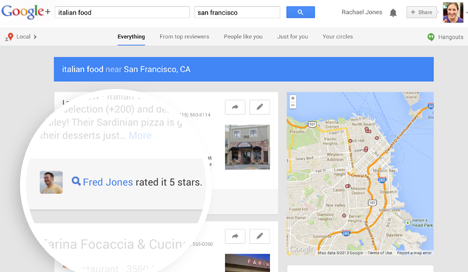
In their never-ending quest to knock Facebook off its perch as the most used social media platform this side of the Kuiper belt, the peeps at Google recently unveiled a host of new Google+ features that make the search giant’s social offering a lot more attractive. In fact, if you aren’t already using Google+, you’ll want to check it out soon.

New in Hangouts

Unless you’ve been living under a rock somewhere, you’ll know that theGoogle+ Hangouts feature is catching fire as a free and easy method for people to communicate, both globally and locally. Numerous politicians (including the POTUS himself) have begun using Hangouts to hold online town hall meetings with their constituents, no doubt saving serious cash on airfare and conference halls. You can also initiate video conferences with up to 10 friends at a time from your computer or your mobile device. In their recent announcement, Google indicated the rolling out of a handful of interesting upgrades that might just get you off that Facebook bandwagon.
  • Google Plus LocationLocation Sharing – If you need to let a friend know where you are and aren’t into seeking out the nearest street sign and typing in the address – or if you just want to let everyone know where the party’s at – you can enable Location Sharing in Hangouts to broadcast your precise location. Your location can be set to approximate (using your Wi-Fi network) or precise (by turning on GPS). Just click the map pin icon in your current Hangout session to launch the Google Maps locator, then click “Share location”. Doing so attaches your location to whatever message you choose to send. Your recipient can then launch the map of your location on their end and plot a course straight to you.
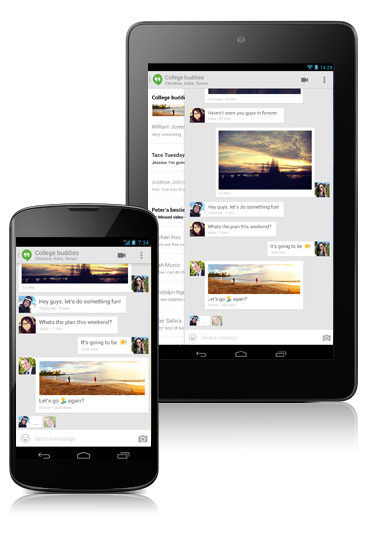
  • Google Plus Hangout SMSSMS Support – Prior to the upgrade, sending an SMS to a Google+ pal required you to toggle between the app and your texting platform. This is no longer the case, as Google Hangouts for mobile now comes with full SMS functionality, which essentially lets you send and receive text messages (or pics or videos) from inside the Hangouts app without the requirement of being logged into Hangouts. This shouldn’t be considered a way to bypass your carrier’s text limit however, as texts still count toward your carrier’s rate – so watch that. SMS support for Hangouts works on all Android devices 4.0 or higher. The way it works is simple: the first time you enter the updated Hangout app, you’re greeted with a message asking you if you want to enable SMS support. Options are “yes” or “maybe later.” After you’ve selected “yes” your conversations are imported into the Hangouts app. From that point forward, unless you decide to disable the feature in your settings, you’ll begin to receive texts through your Hangouts app. You can also choose whether to use Hangouts or your factory SMS platform anytime you begin a new conversation.
  • Animated GIF Support – Because Google knows everyone’s grown tired of sharing boring, motionless images, the new and improved Hangouts will also feature the ability to send animated GIFs.
  • Full-Screen HD – There’s nothing quite like a poor quality video image to make you feel as if the person you’re chatting with is a million miles away, which is why one of the upgraded functionalities of Google+ Hangouts is full-screen, 720p HD. Webcam lighting is also automatically enhanced. Improved video quality is being rolled out across desktop and mobile devices.Google Plus Hangouts
  • Google Effects – In addition to lately released backgrounds that can be used to spice up video chat (these are labeled as still being in the experimental stage) comes the ability to entirely blur out the background in Hangouts, which could be an effective tool for professional video chat purposes. Other improvements to come include toggling between black and white video chat.

Better Organization for Photos and Videos

Sharing photos and videos is a big thing online, and why not? Until the world has decided it’s seen enough crazy cat photos and stupid human tricks, let the sharing continue. Google+ is making this even easier with the implementation of some fun functionalities and nifty organizational tools, many of which will be available for Android, iOS and desktop – still others which will only be available on devices running Android 4.3 or higher. 
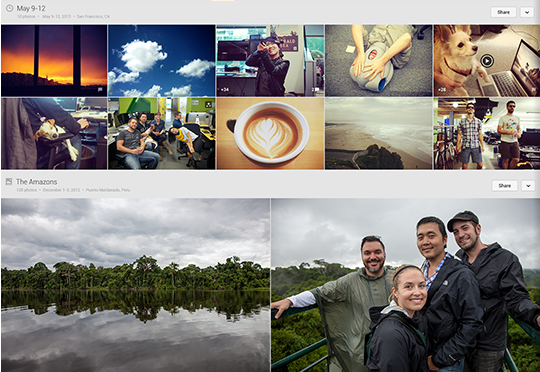
  • Google Plus PhotosAutomatic Photo and Video Backup at Full Size – As a feature of the new and improved Google+ for mobile experience, you can set all photos and videos to automatically back up to your associated Google Drive folder as you take them. Additionally, you can select to back up all photos and videos currently on your mobile device. You can choose to back up your pics and videos at standard size or full size. When you go standard, there’s no limit to the number of either you can store online (as long as pics are 2048px or less and videos are 1080p or less and under 15 minutes long). If you store at full size, pics and videos will be put in your Google Drive storage and will count toward your storage limit there, where the first 15GB are free and you’ll have to pay for anything after. Other options let you choose to back up only when connected over WiFi, or WiFi and mobile connection, or not at all. The good news is that automatically backed up pics and vids do not get shared with anyone until you specify you want that to happen.
  • Auto Awesome – With a name like that, it’s got to promise some pretty cool features, and it does. Auto Awesome offers a suite of unique photo and video enhancements that include: Auto Awesome Action, which can combine a series of photos into one shot to simulate motion; Auto Awesome Eraser, which can literally erase background objects and people from a photo; and Auto Awesome Movie, which automatically stitches selected videos and still images together to create a mini-movie. Auto Awesome Movie includes controls that let you set background music and determine the length of the mini-movie. And of course, the final product is easily sharable via Google+.
  • Google Plus Photo EditingPhoto Editing Tools – Once you access your photo gallery on Drive, you can click on specific images and enhance or edit them. Once you open up a photo, all you have to do is click “Edit” to launch a series of tools that enable you to tune the image, crop and rotate, adjust brightness and saturation, and other controls normally associated with third party editing programs.
  • Intuitive Search – Not everyone has time to name their photos for future reference, or to page through their expansive online photo gallery in search of something they want to share. Now new with Google+ it’s simple to take a snapshot on your phone, save it to Drive, then find it later by keying in a search term. According to Google, it can now recognize over 1,000 different objects. This will purportedly make it easy to enter in search terms like “bike” or “mountain” to instantly access all photos of bikes or mountains in your Drive gallery. Searches can be limited to your own gallery or expanded to include the shared images of your friends in Circles.
  • Sharing Control – Improved sharing controls let you decide when an image gets shared and who gets to see it. Clicking the “share” button on a photo launches a comment box and lets you make photos public or choose certain individuals you want to be able to access the image in Google+.

Not Another Facebook

Google+ may not end up dethroning Facebook as the King of All Social Media anytime soon, but the latest upgrades have made some great headway toward offering a viable alternative for anyone tired of the same-old. Placing heavy emphasis on improvements to photos and videos, in addition to Hangout enhancements, Google is basically playing to its strengths instead of trying to become just another Facebook clone. Kudos.